Google Calendar Phishing: Why Fake Meeting Invites Skip Your Spam Filter
A meeting invitation lands in the office inbox from a company nobody there has ever dealt with. No one booked it. And it is not really addressed to your office at all, it is addressed to a few hundred strangers at the same time.
Offices around here are seeing more of these every month, and almost nobody knows this attack exists yet. So here is the whole thing: what a phishing calendar invite looks like, why it walks right past the spam filter that catches everything else, and the single setting change that stops it.
What one of these actually looks like
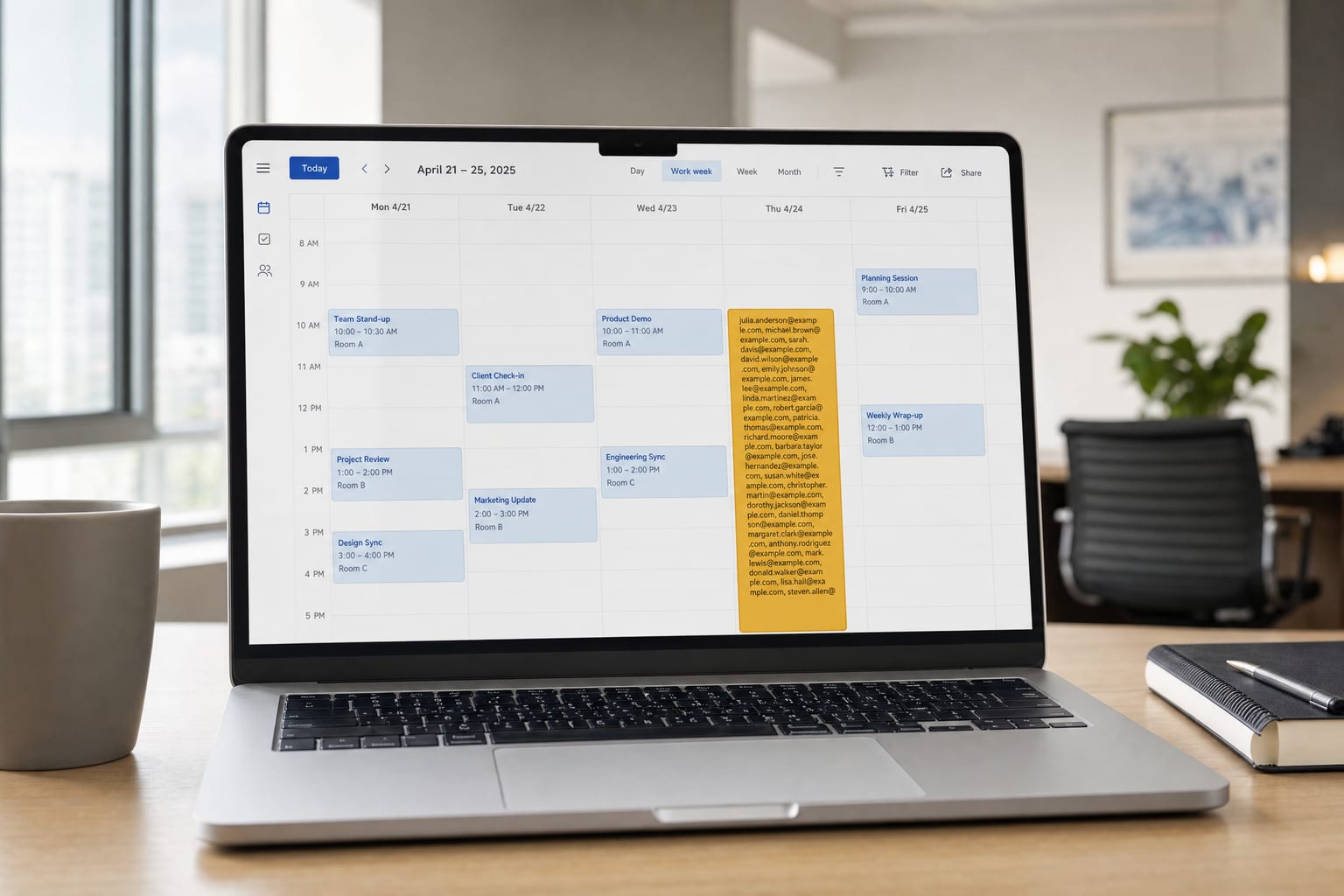
The subject line is the giveaway. Instead of a meeting name, the event title is a raw wall of email addresses:
renbrandt@..., rene.goncalves@..., rene.rivas@..., rene@..., renee.braaten@..., renee@..., rengin@..., reno@..., rentalpartners@..., repair@..., report@..., reporting@..., reports@..., requests@..., research@..., reservations@..., resources@..., response@...
Look at the pattern. Every single address falls in the same slice of the alphabet, running from "renb" to "resp." That is somebody working through a stolen contact list in alphabetical batches, dumping a few hundred addresses into the event title so one invitation blasts all of them at the same time.
The body has a Google Meet link and a dial-in number. Nothing else. No attachment, no fake login page, no invoice.
Why it never hits the junk folder
This is the part that catches people, and it is worth understanding even if you never see one of these.
A calendar invitation is not a regular email. It arrives as a notification from Google's own calendar servers, sent through infrastructure your business already trusts. Every link in the message points to a real google.com address. There is no misspelled domain, no sketchy attachment, no shortened URL. From your spam filter's point of view, there is nothing to catch.
That is the whole trick. The attacker is not sneaking a message past your defenses. They are using a legitimate service exactly as it was designed to work, and letting Google deliver the message for them.
The worse part: it can add itself to your calendar
Google Calendar has a setting that decides which invitations get added to your calendar automatically. If yours is set to accept invitations from everyone, a spam invite can plant a real event on your schedule without you clicking a single thing.
Now it is not just an email you can ignore. It is a meeting on your calendar, with a reminder that will pop up on your phone, looking exactly as legitimate as your 2:00 with a customer. That is a much better hook than a message sitting in an inbox, and it is why this attack keeps growing.
What they are actually after
Since there is no fake login page in the message, people often assume it is harmless junk. It is not. There are usually two goals.
Getting you on the call. The Meet link is the payload. Anyone who dials in is talking to a live person who came prepared to work them: a fake invoice problem, a payment that needs rerouting, a request to install a "support tool" so they can fix something on your screen. Voice is a lot more persuasive than a badly written email, and the scam only has to work once.
Finding out you are real. These lists are enormous and mostly stale. Anyone who RSVPs, replies, or joins the call proves their address is live and actively monitored by a human. That address then gets marked as a confirmed hit and sold on or targeted harder. A simple "Decline" still tells them what they wanted to know.
Red flags to train your front desk on
Share these with whoever watches the shared inbox, because that is where these tend to land.
- The event title is a list of email addresses. Real meetings have names. This is the single clearest tell.
- Gmail says "Invitation from an unknown sender." Google is telling you outright that you have never interacted with this person.
- You have no history with the sender or their company. Search your own mail. If today is the first time that domain has ever appeared, treat it as hostile.
- Your attendance is marked optional on a meeting you never agreed to attend.
- The meeting is scheduled for right now, or within the hour. Urgency is deliberate.
- The sender is a real business in an unrelated industry. A hijacked account at a legitimate company is more convincing than a throwaway address, which is exactly why they use one.
What to do when one shows up
- Do not join the meeting. There is no reason to find out who is on the other end.
- Do not RSVP at all. Not Yes, not Maybe, and not No. Every response confirms a live address.
- Do not reply to the sender. Even a "please stop" or "I think you have been hacked" confirms you are there and reading.
- Report it in Calendar. Open the event, click More actions in the top right, then Report as spam. Google removes the event from your calendar when you do, and takes the whole series if it repeats.
- Tell your team. If it reached you, it very likely reached your coworkers in the same alphabetical batch.
The setting that stops the next one
This is the fix, and it takes about fifteen seconds. In Google Calendar, open Settings, go to the General tab, find Event settings, and change Add invitations to my calendar to Only if the sender is known.
After that, an event is only added automatically when the sender is in your contacts, is part of your organization, or is someone you have actually corresponded with before. Strangers can still send you an invitation, but it can no longer put itself on your schedule.
Two honest caveats. The change only applies to new invitations, so anything already sitting on your calendar has to be cleared out by hand. And Google notes that this setting can reveal to a sender that they are not in your contacts. That is a fair trade for keeping strangers off your calendar.
One more thing worth doing: make sure your real vendors, customers, and staff are saved in your contacts. Otherwise a legitimate invite from a new client can quietly stop landing on your calendar, and missing a real meeting is its own kind of expensive.
If someone already joined or replied
Do not panic, and do not make the person who clicked feel stupid. Shame is the reason these things get hidden instead of reported.
Replying or RSVPing on its own does not compromise anything. It confirms your address is live, so expect more junk aimed at that mailbox, and it is worth watching it a little more closely for a while.
Joining the call is a different matter. If anyone installed software, shared their screen, entered a password, or changed payment details during that meeting, treat it as a real incident. Change the passwords involved, turn on two-step verification if it is not already on, call your bank directly using a number you look up yourself, and have someone qualified look at the machine. We would rather you check it and find nothing than let it sit for a month.
Same playbook, different channel
If this feels familiar, it should. It is the toner pirate call wearing a different hat. Same script: pose as someone with a plausible reason to contact you, catch whoever happens to be watching the inbox, and manufacture just enough urgency that nobody stops to verify. We wrote up that version in our guide on how to avoid toner pirate phone scams, and the defense is identical. Slow down, verify through a channel you chose yourself, and give your team explicit permission to say "let me check on that" to anyone.
The office equipment side of this matters too. Your copier is a networked computer that scans, emails, and stores documents, and it is on the same network as everything else. We cover that in printer and copier security risks if you want the fuller picture.
Ask us before you click
We are a local copier and print shop in Clarksville, and we work with offices across Southern Indiana and the Louisville metro, from New Albany and Jeffersonville to Sellersburg and Floyds Knobs. We are not your IT company, but we are in a lot of offices every week and we see this stuff constantly. If something lands in your inbox and it does not feel right, forward it to us and we will tell you straight whether it is legitimate. That offer stands whether you are a customer or not, and there is no charge for a second opinion.
If it turns out you need real help with it, we work alongside good local IT people and we are glad to put you in touch with one.
Reach us at [email protected] or 812.800.8316, or through our contact page.
If this saved you or your team a headache, a quick review on Google means a lot to a local shop like ours.
Need Help With Your Print Setup?
Get a free consultation and cost analysis from our team.